
Dedoose vs Nvivo vs Usercall: Which Qualitative Analysis Tool is Best?
When you’re evaluating qualitative analysis software, chances are you’ve come across Dedoose and NVivo—two of the most well-known names in the space. Both offer powerful ways to organize, code, and analyze qualitative data, but they were built with slightly different audiences in mind.
As a researcher who has worked with both tools over the years (sometimes painfully so), I can tell you that the choice isn’t as straightforward as reading the feature list. The way you actually work—your research workflow, your budget, your need for collaboration, even your tolerance for learning curves—will often determine which platform is the better fit. And increasingly, researchers are also considering modern AI-first tools like Usercall, which approach qualitative insights from a completely different angle: faster, more scalable interviews and automated analysis with full researcher customizations that cut down the hours of manual coding.
In this post, I’ll break down Dedoose vs NVivo in terms of usability, pricing, strengths, and limitations, then show how Usercall compares as a third option for teams that want speed and depth without the traditional overhead.
Dedoose: Web-Based and Collaboration-Friendly
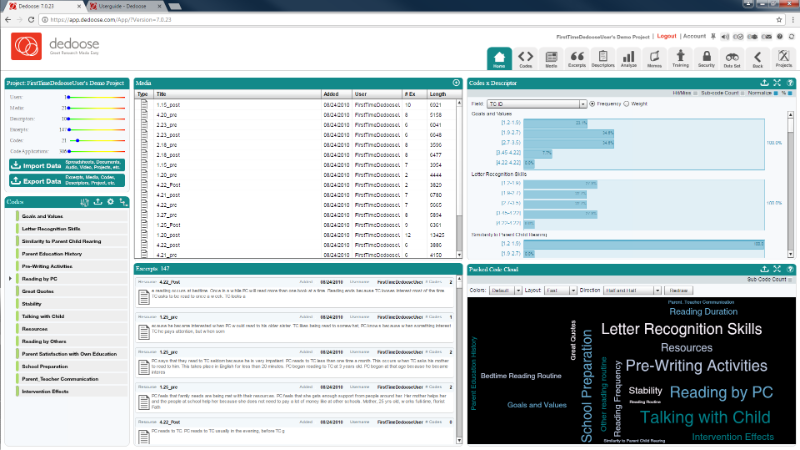
Dedoose is a cloud-based platform that emphasizes team collaboration. Because it’s browser-based, you don’t need heavy installs or high-end machines to run it.
Strengths:
- Accessible from anywhere (no big software downloads).
- Great for distributed research teams.
- Cheaper entry price compared to NVivo.
- Handles mixed-methods projects (qual + quant) fairly well.
Limitations:
- Interface can feel dated and clunky compared to modern SaaS tools.
- Limited AI assistance—coding is still very manual.
- Requires stable internet; not ideal if you’re working offline or in the field.
NVivo: Feature-Rich but Hard to Use
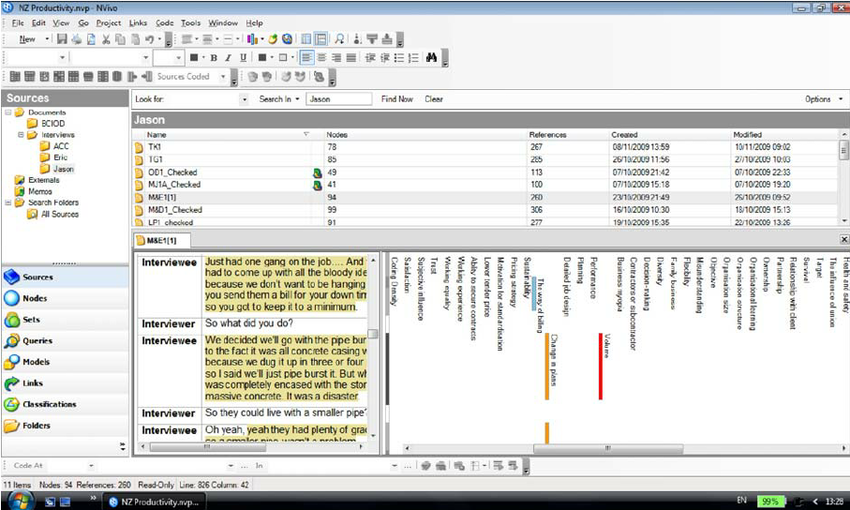
NVivo is often considered the industry standard for qualitative analysis, especially in academia and government projects. It’s feature-rich and supports advanced statistical integrations.
Strengths:
- Powerful coding, categorization, and visualization tools.
- Widely recognized in academia (many institutions already have licenses).
- Works well with large, complex datasets.
- Strong text analysis features like word frequency and matrix coding queries.
Limitations:
- Expensive (licenses start at $253/year and go up).
- Steep learning curve, with training often required.
- Desktop-based and very outdated UI.
- AI features remain basic and mostly bolt-on, not workflow-changing.
Usercall: AI-Powered Qualitative Analysis, Built for Speed
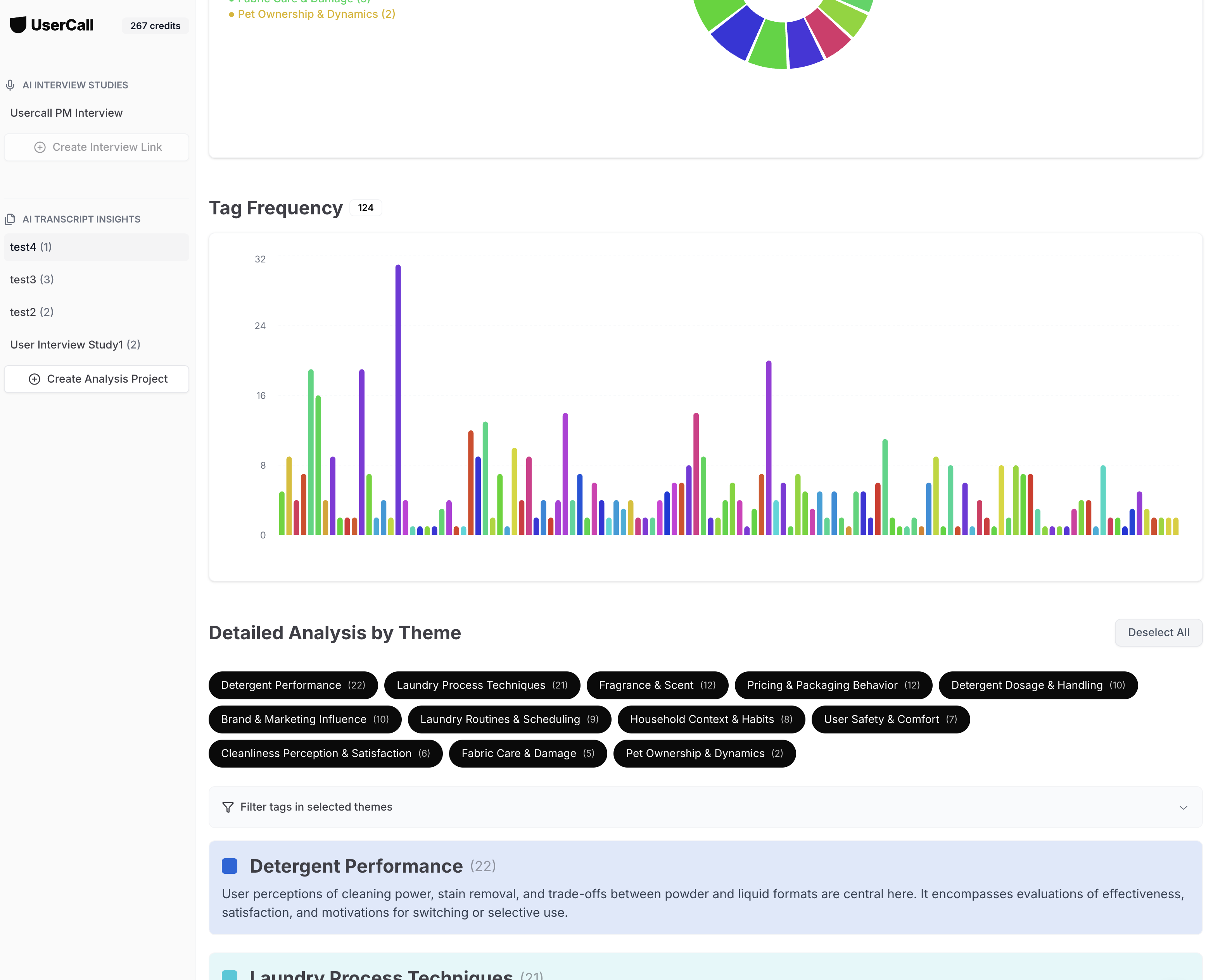
Usercall is built from the ground up for fast, AI-powered qualitative analysis. Unlike legacy tools that require tedious manual coding from imported transcripts, Usercall lets you upload raw qual data—or even run AI-moderated interviews—and instantly get structured themes, tagged quotes, and insight-rich summaries. It’s designed to help modern teams focus on meaning and decision-making, not mechanics. Self-serve from $89 a month. Your first interview is free. No sales call.
Strengths:
- Full-stack AI analysis: automatically generates codes, subthemes, sentiment, and summaries you can refine with human-in-the-loop editing.
- Human-in-the-loop flexibility: easily edit or refine AI-suggested tags or themes to match your research goals.
- Comprehensive reporting: tag/theme summaries, sentiment trends, frequency analysis, and pattern detection—all built in.
- AI-moderated interviews: no need to always schedule or manually moderate participants.
- Flat-rate monthly pricing ($99–199/month) instead of per-seat licenses, making it scalable for teams.
- Easy to use & fast very easy to use, modern UI and fast compared to manual coding in Dedoose or NVivo—teams report reducing analysis time by up to 80%.
Limitations:
- Less suited for contexts that demands strict manual coding protocols or legacy institutional standards.
- Still a newer entrant with less adoption compared to NVivo.
Side-by-Side Comparison
| Tool | Strengths | Limitations | Pricing | Best For |
|---|---|---|---|---|
| Dedoose |
|
| ~$15–$25 per user/month | Teams on a budget needing collaboration in the cloud |
| NVivo |
|
| $253+/year per license | Academics and institutions with complex qualitative projects |
| Usercall |
|
| $99–199/month (flat rate) | Product, UX, and marketing teams needing fast insights at scale |
Dedoose vs NVivo: Feature-by-Feature Comparison
| Feature | Dedoose | NVivo |
|---|---|---|
| Platform | Web-based (browser only) | Desktop (Windows/Mac) |
| Coding tools | Manual tagging, code weighting, excerpt management | Node hierarchies, matrix queries, pattern-based auto-coding |
| Collaboration | Real-time multi-user, built-in | Limited — file sharing or NVivo Server required |
| AI features | None meaningful | Basic rule-based auto-coding only |
| Mixed methods | Strong — purpose-built for qual + quant integration | Supported, but more complex to configure |
| Learning curve | Moderate — browser UI, but dated | Steep — formal training often required |
| Offline support | No — requires internet | Yes — fully local |
| Pricing | ~$15–25/user/month | $253+/year per license |
Does Dedoose Use AI?
No — not in any meaningful sense. Dedoose was built before AI-assisted coding became viable and has not made significant investments in that direction. Coding in Dedoose is manual: you read excerpts, apply codes by hand, and manage your codebook yourself.
Later versions mention limited "AI assistance," but in practice this amounts to basic text search and suggested codes — not automated thematic synthesis or pattern detection. If AI-powered analysis is a requirement, Dedoose is not the right tool.
NVivo's "Auto Code" is only marginally better. It applies existing codes based on text patterns — rule-based matching that works best on structured data like survey responses. Neither tool offers the kind of real-time synthesis or insight generation that modern AI-native platforms now provide.
Which Should You Choose?
The right choice comes down to your research context, team structure, and budget.
Choose Dedoose if:
- Your team is distributed and needs real-time collaboration without a server setup
- You are running mixed-methods research that integrates quantitative and qualitative data
- Budget is a constraint and a per-user monthly subscription fits better than an annual desktop license
- You work entirely in a browser and have reliable internet access
Choose NVivo if:
- You are in academia and your institution has an existing license or subsidized access
- Your project involves large, complex datasets that need advanced querying and visualization
- You need offline access and a fully local desktop environment
- Your institution or publisher requires NVivo as the analysis tool
Want the full picture before you decide? Read our deep comparison of ATLAS.ti, NVivo, and UserCall to see how these tools hold up across more use cases—or try UserCall free and see how fast AI-assisted qualitative analysis can move.
Dedoose and NVivo each have their tradeoffs, but they're not your only options. For a broader view of what's actually working for research teams right now, read our roundup of the 5 qualitative data analysis tools that actually work — and try Usercall if you want AI-powered analysis without sacrificing collaboration or rigor.
Related: Atlas.ti vs Dedoose vs Usercall comparison · 7 best NVivo alternatives for qualitative research · what teams underestimate when switching from NVivo