MAXQDA vs Usercall: Qualitative Research & Team Collaboration
qualitative data analysis software
MAXQDA & Usercall AI Alternative Overview

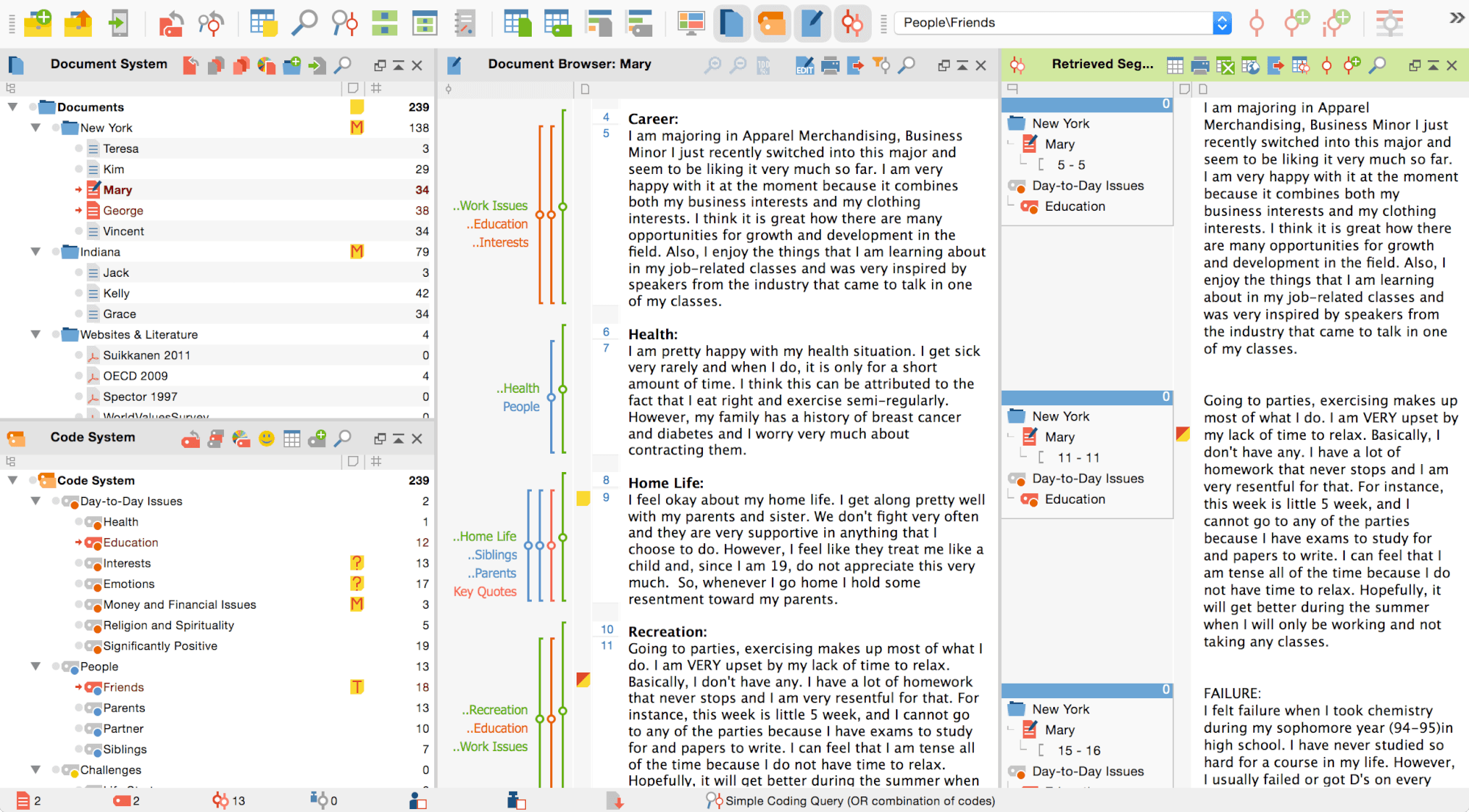
MAXQDA is a qualitative data analysis software tool for qualitative and mixed methods research. It allows users to analyze texts, images, audio/video files, websites, tweets, focus group discussions, survey responses, and more.

Detailed Comparison Table
| Feature | Usercall AI | MAXQDA |
|---|---|---|
| Research Rigor & Methodology | ||
| AI Automated Coding & Themes | ✅ Yes | ✅ Yes |
| Editable codes for iterative refinement | ✅ Yes | ✅ Yes |
| Multi-source analysis: interviews, tickets & reviews | ✅ Yes | ✅ Yes |
| Adaptive, AI-decided follow-up depth (not a fixed follow-up count) | ✅ Yes | ❌ No |
| Evidence-backed analysis — themes traceable to exact quotes | ✅ Yes | ✅ Yes |
| Detailed AI summaries per theme | ✅ Yes | ✅ Yes |
| AI Chat with Your Data | ✅ Yes | ❌ No |
| Voice of Customer (VoC) analysis | ✅ Yes | ❌ No |
| Research | ||
| In-product AI Moderated Interviews | ✅ Yes | ❌ No |
| In-product research triggers (e.g. post-purchase insights) | ✅ Yes | ❌ No |
| Visual stimulus / concept testing (show images or prototypes during interview) | ✅ Yes | ❌ No |
| Self-Serve & Pricing | ||
| Self-serve — no sales call required | ✅ Yes | ✅ Yes |
| Free to try / transparent pricing | ✅ Yes | ✅ Yes |
| Pay-as-you-go | Pay-as-you-go | Starts around $34– |
| Free to try / transparent pricing | ✅ Yes | ✅ Yes |
| Platform | ||
| Ideal For | Product Teams, PMs, UX Managers, Startups, Market Researchers | Academic and professional qualitative researchers doing deep manual and mixed-methods analysis |
Features
- Automated Coding & Themes: No
- Editable codes for iterative refinement with AI: Yes
- Analyze interviews, tickets & reviews (unstructured text): Yes
- AI Chat with Your Data: No
- Detailed AI summaries of tags & themes: No
- Zero manual coding — works out of the box: Yes
- Conduct AI Moderated Interviews: No
- Web/Mobile: ✅ Web/Desktop
- Ease of Use: ⭐⭐⭐ (Moderate Learning Curve)
- Ideal For: Academic Researchers, Social Scientists, UX & Product Designers
- Pricing - Monthly: Pricing varies
- Pricing - Pay-as-you-go: No
Pricing Comparison
MAXQDA: Pricing varies
Which One Should You Choose?
Choose Usercall if..
Choose MAXQDA If..
- ✅ You need robust team collaboration features.
- ✅ You prefer to spend more time manually coding & analyzing w/ complex features
- ✅ Your work in academia and prefer desktop installed software
Final Verdict: Usercall vs. MAXQDA
MAXQDA is better suited for qualitative researchers who require advanced analysis tools, team collaboration features, and support for a wide range of data types.
Does MAXQDA have AI coding?
MAXQDA has introduced some AI-assisted features in recent versions, such as AI Assist for suggesting codes or summarizing segments. However, these features still require researchers to review, validate, and manually apply or adjust codes — they do not replace the manual coding process. Researchers must still build codebooks, assign codes to segments, and organize themes by hand. This is fundamentally different from Usercall, which performs fully automated theme extraction with zero manual coding required from the user.
What is the key difference between Usercall and MAXQDA for product teams?
The core difference is automation versus manual research methodology. MAXQDA is built for academic and professional researchers who want deep control over a structured qualitative research process — it rewards those with time, training, and a need for rigorous methodological documentation. Usercall is built for product managers, customer success teams, and CX leads who need fast, actionable insights from user feedback without any research background or setup. Usercall can process thousands of responses in minutes and surface themes automatically, while MAXQDA requires significant hands-on work before any insights emerge.
Can MAXQDA automatically analyze app store reviews or support tickets at scale?
Not in a meaningful automated sense. MAXQDA can import documents and text files, so reviews or tickets could technically be brought in, but the tool is not designed for bulk ingestion or automated processing of thousands of responses. There is no pipeline to connect directly to app stores, helpdesk platforms, or review sources, and all analysis still requires manual coding effort. Usercall, by contrast, is purpose-built to ingest app reviews, support tickets, NPS responses, and survey data in bulk and automatically surface themes and insights without any manual steps.
How do Usercall and MAXQDA compare on AI moderated interviews?
MAXQDA has no AI moderated interview capability whatsoever — it is an analysis tool, not an interview tool, and it requires a human to conduct interviews before any data can be imported for analysis. Usercall offers AI moderated interviews as a core feature, meaning the platform can autonomously conduct user interviews at scale, asking follow-up questions and probing for depth, then automatically analyze the resulting transcripts. This makes Usercall a full end-to-end solution for user research, while MAXQDA only addresses the analysis phase after data has already been collected.
When should a team switch from MAXQDA to Usercall?
Teams should consider switching to Usercall when the volume, speed, or operational context of their feedback analysis no longer fits a manual research workflow. Specific signals include: needing to analyze hundreds or thousands of responses quickly, wanting insights within minutes rather than days or weeks, not having a dedicated qualitative researcher on staff, needing to monitor ongoing customer feedback streams (VoC) rather than run one-off projects, or wanting to combine interview collection and analysis in a single tool. MAXQDA remains a strong choice for academic research, mixed-methods studies, or contexts where rigorous methodological documentation and deep manual control are required.
Does MAXQDA let you chat with your data conversationally?
MAXQDA does not offer a conversational AI chat interface as a core built-in feature. While newer versions include some AI Assist functions for summarization or code suggestions on selected segments, users cannot type open-ended questions and receive synthesized answers drawn across their entire dataset in a chat format. Usercall includes an AI Chat with Your Data feature that allows users to ask natural language questions — such as 'What are the top pain points around onboarding?' — and receive instant, evidence-backed answers synthesized from all imported feedback, making exploratory analysis fast and accessible to non-researchers.
Looking for more options? See our full guide to MAXQDA alternatives — comparing MAXQDA against 5+ tools by price, features, and use case.

More Qualitative Data & Research Tools
- → Koji Alternative
- → User Intuition Alternative
- → Strella Alternative
- → Talkful Alternative
- → Conveo Alternative
- → Tellet Alternative
- → Glaut Alternative
- → Outset Alternative
- → Listen Labs Alternative
- → Marvin Alternative
- → Prolific Alternative
- → Amplitude Alternative
- → PostHog Alternative
- → Userlytics Alternative
- → dscout Alternative
- → Respondent Alternative
- → Thematic Alternative
- → GetFeedback Alternative
- → Lookback Alternative
- → Survicate Alternative
- → UserVoice Alternative
- → Canny Alternative
- → Gong Alternative
- → Aurelius Alternative
- → FullStory Alternative
- → Mixpanel Alternative
- → Pendo Alternative
- → Sprig Alternative
- → Maze Alternative
- → Medallia Alternative
- → Gainsight Alternative
- → Productboard Alternative
- → Hotjar Alternative
- → Typeform Alternative
- → SurveyMonkey Alternative
- → Qualtrics Alternative
- → UserTesting Alternative
- → Dovetail Alternative
- → MAXQDA Alternative
- → QDA Miner Alternative
- → ATLAS.ti Alternative
- → NVivo Alternative
- → Dedoose Alternative