
5 Qualitative Data Analysis Tools That Actually Work (2026)
New to the term? Our guide to CAQDAS software explains what these tools should do and how to pick one.
Qualitative research is no longer limited by data collection. It’s limited by analysis speed, synthesis quality, and team bandwidth.
Interviews, open-ended surveys, usability sessions, customer feedback, and voice transcripts generate rich insight—but only if you can structure, code, and interpret them efficiently. For most researchers today, the bottleneck isn’t talking to users. It’s turning messy qualitative data into clear, defensible insight before stakeholders lose patience.
If most of your data is open-ended survey answers, reviews or tickets rather than transcripts, see our guide to text analysis software for research and CX teams.
That’s why qualitative data analysis software matters more than ever in 2026.
Modern QDA tools don’t just store transcripts or support manual coding. The best ones help researchers:
- Extract themes faster without losing nuance
- Reduce manual tagging and rework
- Scale analysis across projects and teams
- Balance AI automation with human judgment
In this guide, we break down five of the most widely used qualitative data analysis software tools—from AI-native platforms to established academic standards. For each tool, we cover what it’s best at, where it struggles, and who should actually use it based on real research workflows, not feature checklists.
If you’re choosing between speed vs rigor, solo work vs collaboration, or AI assistance vs manual control, this comparison will help you make that trade-off explicit—before you commit time, budget, and team effort.
1. Usercall

Overview:
Usercall offers AI-driven qualitative data analysis and data capturing through customizable AI coding and analysis tools as well as AI agent that moderates user interviews.
Key Features:
- AI automated coding with excerpts: Easy and customizable automated thematic analysis with range of analysis features
- AI Chatbot Q&A: Allows for open ended analysis to uncover insights from your data
- AI moderated voice interviews: 10x deeper and faster qualitative user data gathering (vs surveys)
Pros:
- Very easy to use automated coding and analysis tools
- AI moderated user interview feature is a gamechanger
- Pay-as-you-go pricing option
- Web and mobile access with simple UI and UX
Cons:
- Lack of collaboration features
- Feature set may be less extensive than traditional desktop software like NVivo or ATLAS.ti.
Why It Stands Out:
I've used the AI coding tools and AI moderated interviews for our own research projects. It's 10x'ed our productivity and output while having full control over the quality.
Tip:
- Organize your data: Although Usercalls' analysis tool can take in many different data formats (text files, csv's..etc) it helps to have good quality data like high quality transcripts ready before—as quality of output will depend on quality of input data.
2. Dedoose

Overview:
Dedoose is a cloud-based software well-suited for teams working remotely or projects that require a more flexible pricing model. Its focus on mixed methods makes it versatile for a broad range of studies.
Key Features:
- Cloud-Based Access: Work from any location with an internet connection.
- Pay-as-You-Go Pricing: Subscription-based, which can be more cost-effective for shorter projects.
- Mixed Methods Analysis: Handles both qualitative and quantitative data, including surveys and scales
Pros:
- Pay-as-you-go pricing model offers cost-effective flexibility.
- Ideal for geographically dispersed teams.
- Regular updates and improvements are rolled out automatically on the cloud platform.
Cons:
- Requires a stable internet connection.
- Feature set may be less extensive than traditional desktop software like NVivo or ATLAS.ti.
Why It Stands Out:
I once collaborated with colleagues spanning three continents. Dedoose’s cloud-based framework allowed real-time coding updates—a crucial advantage given our varied time zones.
Tip:
- Export Regularly: Although Dedoose has automatic backups, creating your own local exports after major coding sessions provides peace of mind.
3. NVivo

Overview:
NVivo has long been a staple in qualitative research. It’s known for its robust coding capabilities and visual tools, making it a go-to for many academic and professional researchers.
Key Features:
- Powerful Coding: Manual, automatic, and hybrid approaches are supported.
- Data Visualization: Offers word clouds, charts, and cluster analysis to quickly identify emerging themes.
- Mixed Methods Support: Seamless integration with quantitative datasets from SPSS and Excel
Pros:
- Intuitive user interface for coding and analysis.
- Extensive support resources, including tutorials and user communities.
- Robust range of visualization options.
Cons:
- Can be expensive, especially for individual licenses.
- Requires a bit of a learning curve for new users.
Why It Stands Out:
In one community needs assessment project, NVivo’s visualization features helped my team quickly spot overlapping themes—something that saved us hours of manual cross-referencing.
Tip:
- Leverage Tutorials: NVivo provides a rich library of online resources, which can reduce the learning curve significantly.
4. ATLAS.ti

Overview:
ATLAS.ti excels at handling complex projects and diverse data types, from text to audio and video. Its “network view” feature is a major draw for researchers who like to visually map relationships between themes.
Key Features:
- Network Views: Intuitive graphical representations of codes and memos.
- Multi-Platform Access: Available for Windows, Mac, and as a cloud-based version.
- Collaboration Tools: Supports teamwork with version control and shared databases.
Pros:
- Excellent for visual learners thanks to its powerful network and graphical mapping features.
- Supports a variety of data formats.
- Flexible cloud option for remote teamwork.
Cons:
- The interface may feel less intuitive at first compared to NVivo.
- Pricing can be on the higher side for advanced features.
Why It Stands Out:
On a cross-departmental health study, we found ATLAS.ti’s collaboration tools particularly helpful because multiple analysts could work simultaneously without overwriting each other’s efforts.
Tip:
- Start Small: If you’re new to ATLAS.ti, try it on a smaller project first to master the interface before tackling larger datasets.
5. MAXQDA
Overview:
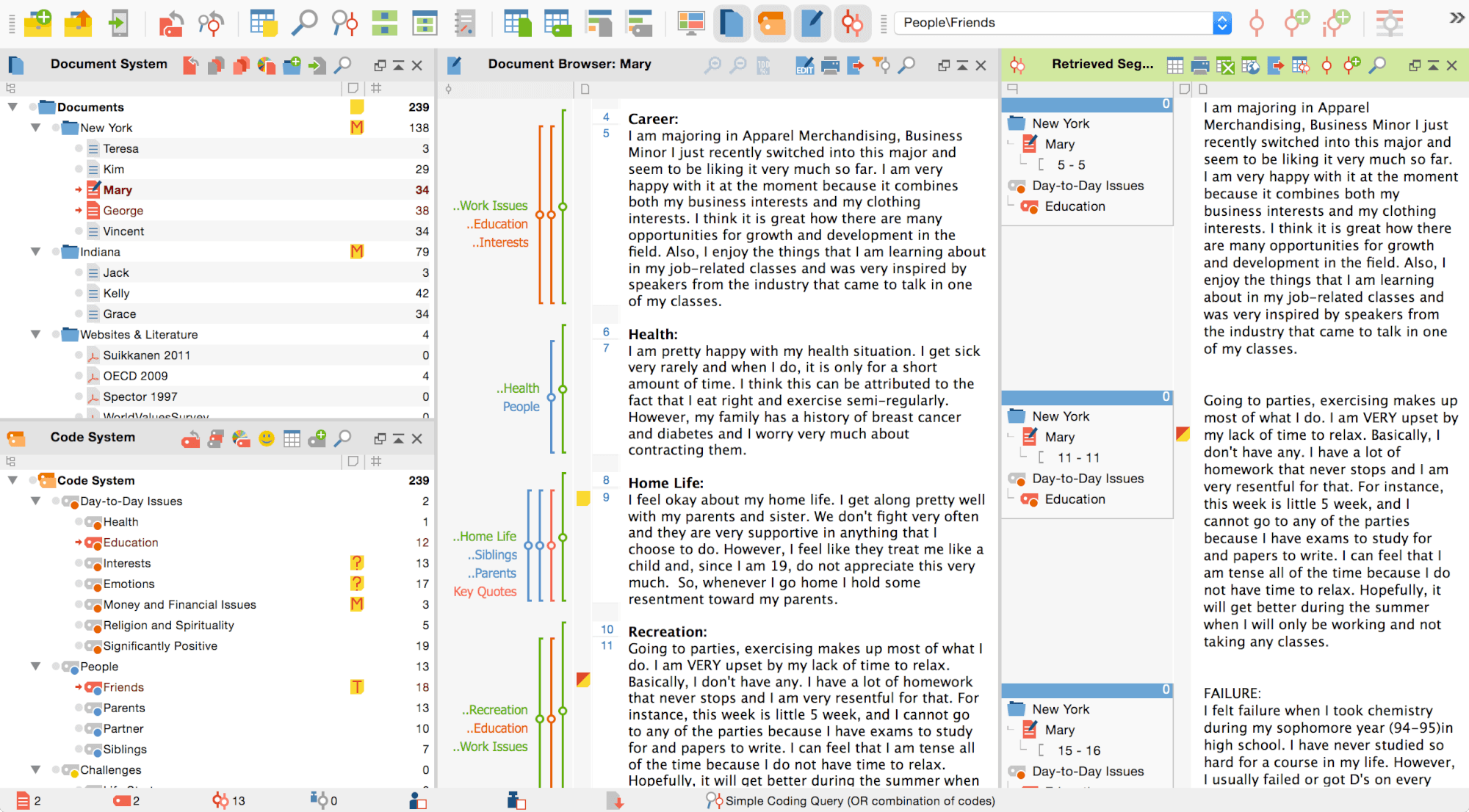
MAXQDA is praised for its user-friendly design. It’s often a favorite among researchers who want a smoother learning curve without sacrificing functionality.
Key Features:
- Straightforward Interface: Codes, memos, and transcripts are laid out in an organized manner.
- Mixed Methods Support: Combines qualitative and quantitative data in one platform.
- MAXMaps: Helps visualize connections in your data via conceptual maps.
Pros:
- Known for its straightforward interface, making it beginner-friendly.
- Offers strong mixed-methods support.
- Highly regarded customer support and regular software updates.
Cons:
- May lack some advanced automation features compared to NVivo or ATLAS.ti.
- Some features like teamwork and cloud-based collaboration come at an additional cost or require higher licensing tiers.
Why It Stands Out:
During a UX research engagement, MAXQDA’s layout allowed junior team members to ramp up quickly, making the coding process efficient and cohesive.
Tip:
- Utilize ‘Smart Coding Tool’: This feature makes it easier to review and refine codes across different data segments.
How Tool Choice Affects Cost, Learning Curve, and Team Scaling
Choosing qualitative analysis software is not just about features. It directly affects total cost, onboarding time, and how well teams scale.
Legacy desktop tools often rely on complex licensing models and steep learning curves. That can slow adoption, increase training costs, and make collaboration harder as more researchers join a project. Newer platforms tend to trade depth for speed, prioritizing faster setup, simpler workflows, and easier team access.
Before committing, teams should look beyond headline features and evaluate licensing flexibility, onboarding time, and long-term collaboration costs. Comparing tools like NVivo pricing, ATLAS.ti pricing, and MAXQDA pricing side by side helps reveal how different models impact real research workflows over time. For teams outgrowing legacy tools, reviewing modern NVivo alternatives can surface more scalable options.
Choosing the Right Software
Ultimately, selecting the best qualitative data analysis software depends on your project’s scope, budget, and how you prefer to visualize and collaborate on data. Here’s a quick recap:
Before you pick from that recap, pressure-test the tool on four things. How fast can you go from raw interviews to a decision? Can you trace a finding back to the situation the person was in? Does the tool connect what people say with what they do? Can you keep learning after the first study, or only run a one-off?
A second pass is worth it when those four already hold. Can you compress a large set of interviews without losing the evidence behind a claim? Can the researcher steer the analysis and challenge a theme? Can a product manager read the result without a long walkthrough? Context and behavior show up in both checks. The extra three are compression, control, and whether someone outside the research team can use the output.
- Usercall - AI driven thematic analysis, modern, easy-to-use with deep customization options for high quality coding & insights.
- Dedoose – Affordable, cloud-based solution for geographically distributed teams.
- NVivo – Comprehensive features for analysis and visualization, plus strong mixed methods support.
- ATLAS.ti – Great for complex projects and visual mapping of relationships.
- MAXQDA – User-friendly and well-suited for combining qualitative and quantitative data.
Final Tip:
Many of these platforms offer free trials, so take advantage of them to see which interface and feature set resonates most with your workflow. A little upfront experimentation can save you substantial time and effort in the long run, and ensure you have the right tool to glean the deepest insights from your qualitative data. For more, check out our full guide to qualitative data analysis software
For a broader view of the tools, workflows, and AI capabilities reshaping qualitative research, check out our full qualitative data analysis software guide—it covers more tools and goes deeper on what each approach is actually best for. If you're ready to move beyond manual coding and slow exports, give Usercall a try and see how AI-assisted analysis changes the pace of your research.
For a deeper look at how the two dominant platforms in this space compare, the ATLAS.ti vs NVivo breakdown explains exactly who each tool is built for and where both fall short for modern research teams. If AI-assisted analysis sounds like a better fit for your workflow, Usercall is worth exploring as a practical alternative.
Related: MAXQDA vs NVivo: which is better for most researchers · NVivo vs AI qualitative analysis · ATLAS.ti vs AI qualitative analysis