
Thematic Analysis Coding: The 7-Step Method That Finds Insights, Not Just Repeated Quotes
I have seen a product team spend two weeks coding 22 customer interviews, produce 87 labels and a color-perfect affinity map, then ship the exact feature customers did not need. Their headline finding was that users wanted “more customization.” The interviews actually showed something more uncomfortable: customers were avoiding the product because they could not tell whether their first configuration had worked. The team built more options when they needed to build more certainty.
That is the central failure of thematic analysis coding. Most teams record what participants mention. Strong researchers identify the hidden logic behind what participants do. If your analysis ends with categories such as “pricing,” “onboarding,” “navigation,” and “feature requests,” you have organized data. You have not yet generated insight.
Thematic analysis coding should help market researchers, UX researchers, product managers, and business leaders answer a harder question: what mechanism is driving this behavior, for whom, under what conditions, and what should we change because of it? This guide lays out the workflow I use to get there without drowning in codes, treating interview frequency as proof, or allowing AI-generated summaries to flatten the nuance that makes qualitative research valuable.
What Thematic Analysis Coding Should Actually Produce
Thematic analysis coding is the process of labeling meaningful parts of qualitative data and synthesizing those labels into patterns, or themes. But that definition is too polite to be useful. In practice, the work has three distinct layers, and confusing them is why research readouts so often feel obvious.
Data extract: “I entered all the account information, but I did not know whether the numbers in the forecast were reliable enough to send to my director.”
Code: Needs confidence in output quality before sharing internally.
Theme: Users will not invest their reputation in an unfamiliar system until they can verify its first result.
Decision implication: Make validation visible before asking users to complete advanced setup or invite stakeholders.
The extract is evidence. The code is a concise interpretation of one meaningful moment. The theme is an explanation that connects multiple moments. The implication turns that explanation into a decision.
My rule is blunt: if a theme cannot change a product, marketing, research, or business decision, it is probably a topic rather than a theme. “Users care about trust” is a topic. “Operations managers need an audit trail before they will act on AI recommendations that affect customers” is a theme. The second statement identifies the actor, the condition, the barrier, and the likely intervention.
Why the Common Coding Approach Falls Short
The standard workflow—highlight transcripts, apply broad tags, count tags, report the most common ones—looks rigorous because it is orderly. It is also the fastest route to shallow findings.
- It mistakes frequency for importance. Eighteen people can mention a minor inconvenience, while three enterprise buyers can identify the precise risk preventing a six-figure purchase.
- It captures nouns instead of decisions. Labels such as “dashboard,” “integration,” or “price” describe a subject. They do not explain the behavior or tradeoff connected to it.
- It loses the moment of use. “The workflow is confusing” means something very different when someone is calmly exploring than when they are preparing a board update in 15 minutes.
- It creates false certainty. A spreadsheet with 60 codes can make a weak interpretation look more scientific than it is. Granularity is not rigor.
I once inherited a research synthesis for a B2B analytics product where “reporting needs” was the largest code. It appeared in 16 of 19 interviews. The obvious recommendation was to add reporting features. When I reread the source excerpts in context, the pattern was different: participants exported data because executives did not have product access and did not trust screenshots without a traceable source. The issue was not a lack of charts. It was a credibility gap between the analyst and the executive audience. A downloadable report helped, but an auditable shared view and clearer data lineage were the more strategic response.
Common approaches fail because they treat language as the unit of analysis. In customer research, the unit that matters is the decision situation: a person, trying to make progress, under a constraint, with something to gain or lose.
The Better Mental Model: Code the Decision, Not the Comment
Every useful piece of qualitative evidence can be examined through four lenses: behavior, trigger, tradeoff, and consequence. This is the smallest framework I know that consistently turns interview talk into usable thematic analysis.
- Behavior: What did the participant do, postpone, abandon, workaround, purchase, or delegate?
- Trigger: What event, realization, task, or constraint prompted that behavior?
- Tradeoff: What were they trying to protect or optimize: time, certainty, status, budget, control, privacy, or effort?
- Consequence: What did the behavior enable, cost, or prevent?
Consider a participant saying, “I need a Slack integration.” A basic code would be “integration request.” A decision-centered code might be “avoids a new destination because project updates must happen where the team already coordinates.” That code points toward a broader theme: adoption stalls when a product demands a new communication habit without replacing an existing one.
This distinction changes what a team builds. The first interpretation asks for another integration. The second asks whether the product can enter the existing workflow with alerts, sharing, embedded context, or a tighter handoff. The feature request may still be valid, but now it is tied to the job it must perform.
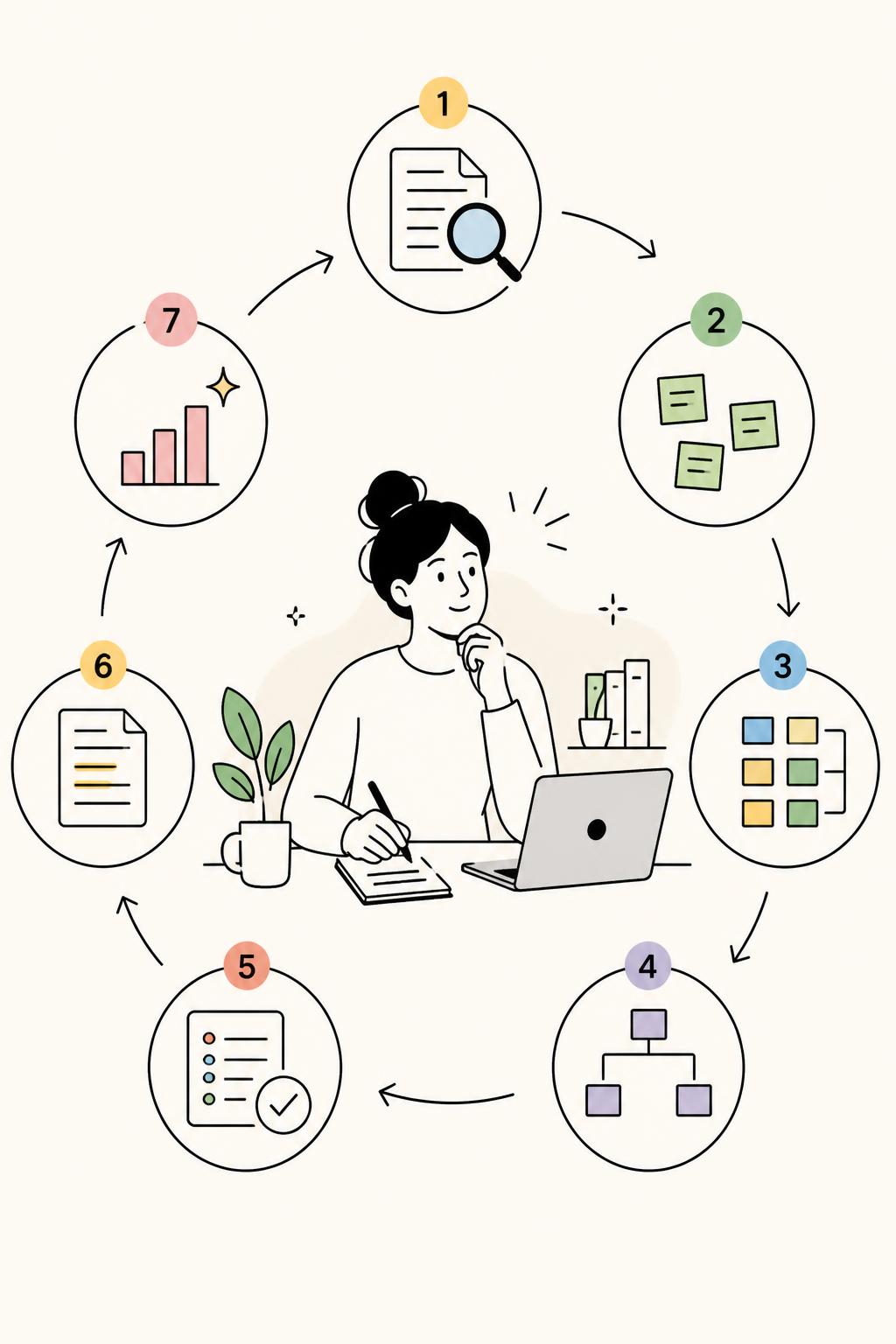
A 7-Step Thematic Analysis Coding Workflow
1. Frame the analysis around a decision
Never begin with “analyze onboarding feedback” or “find themes in customer interviews.” Those prompts guarantee a pile of general observations. Start with a decision question: “Why do trial users leave before creating a first project?” “What makes teams trust an AI recommendation enough to use it externally?” “Which constraints stop active customers from expanding usage?”
The question creates a boundary. It tells you what evidence deserves sustained attention while leaving room for truly unexpected patterns.
2. Read once before coding aggressively
On the first pass, write brief margin notes about tension, surprise, emotionally charged moments, workarounds, and contradictions. Do not rush into a prebuilt codebook. Premature structure makes researchers hear only what they expected to hear.
Pay special attention to shifts in language. When participants move from “I like” to “I need,” or from “it is annoying” to “I cannot risk,” they are revealing priority and stakes.
3. Create initial codes that preserve causal meaning
Use short, specific verb phrases. “Reporting” is weak. “Exports reports to create executive confidence” is useful. “Confusion” is weak. “Pauses setup because the next choice feels irreversible” is useful.
At this stage, code generously, but not indiscriminately. A meaningful code should capture a behavior, belief, context, or tension relevant to the decision question. Do not code every sentence merely because your software makes it easy.
4. Build a provisional codebook after three to five interviews
Create a definition, inclusion rule, exclusion rule, and example for each recurring code. This protects consistency, especially when multiple researchers are involved. It also exposes duplicate labels early.
Merge codes when they would lead to the same action. Split them when their mechanism differs. For example, “lack of trust” may need to become distrust of data accuracy, distrust of automated judgment, and distrust caused by poor visibility. Each requires a different response.
5. Search for negative cases before naming themes
Once a pattern seems obvious, deliberately hunt for participants who do not fit it. This is where serious qualitative analysis separates itself from confirmation bias dressed up as synthesis.
In a study of an automation feature, 11 participants said setup felt too demanding. It would have been easy to conclude that the feature needed simpler onboarding. But four customers adopted it rapidly. Those customers had a recurring, high-volume task and could predict the time they would save. The stronger theme was: users accept setup effort when the product makes the future payoff concrete. That finding led to a use-case calculator and task-specific templates, not just a shorter setup flow.
6. Form themes using the “because” test
A valid theme should complete this sentence: “Participants did or believed X because Y, which led to Z.” If you cannot write that causal statement, you likely have a category rather than an insight.
- Cluster codes that share an underlying mechanism, not simply a similar topic.
- Draft a one-sentence causal theme statement.
- Review supporting extracts and counterexamples side by side.
- Define the segment, situation, or research moment where the theme holds.
- Write the decision or experiment the theme makes possible.
7. Prioritize themes by consequence, not volume
Use prevalence as a signal, never as a verdict. I assess each theme against four questions: How widely does it appear? How strongly does it affect behavior? How strategically important is the affected segment or moment? Can the organization act on it?
A theme raised by four participants may be more important than one raised by 14 when it explains churn among high-value accounts, failure at a critical conversion step, or a safety concern that users will not easily articulate. Qualitative counts help prevent cherry-picking; they do not turn an interview sample into a survey.
How AI Changes Thematic Analysis Coding Without Replacing Judgment
AI can accelerate transcript review, retrieve evidence across large studies, surface candidate patterns, and expose inconsistencies in a codebook. It is exceptionally useful when you need to compare 30 interviews, open-text survey responses, support conversations, and moderated research in one evidence base.
But AI is particularly prone to producing polished, generic themes: “users value simplicity,” “trust is important,” “customers want more control.” These statements are plausible enough to survive a busy stakeholder meeting and vague enough to produce no useful action. That is the danger.
Research-grade AI-native qualitative analysis should keep researchers close to source evidence, allow them to inspect and challenge theme claims, preserve participant context, and control how codes are defined and merged. Usercall is designed for this kind of work, combining AI-moderated interviews with deep researcher controls for qualitative analysis. It can also help teams intercept users at key product-analytics moments—after a drop-off, failed activation event, or repeated workaround—to learn the reason behind a metric while the context is still fresh.
The researcher’s job does not disappear. It becomes more demanding: evaluate whether a pattern is real, identify its boundary conditions, and decide whether the explanation is strong enough to justify action.
Turn Themes Into a Readout That Forces Better Decisions
Do not end a thematic analysis with themes followed by a gallery of quotes. Give every theme a decision-ready structure: pattern, evidence, boundary, implication, next test.
For example: self-serve users postpone account setup when they cannot estimate the time commitment; the pattern was strongest among solo operators working between client tasks; it was weaker among operations teams with dedicated implementation time; show a time estimate, allow progress to be saved, and provide a credible quick-start path; test the impact on setup completion and first-week activation.
This format makes the limits of the finding visible. It also prevents the research team from making inflated claims. A theme is not universal truth. It is a well-supported explanation of a pattern within a defined context.
The Standard for Excellent Thematic Analysis Coding
Excellent thematic analysis coding makes a messy set of human accounts more useful without making them falsely neat. A skeptical stakeholder should be able to trace every recommendation back to real participant evidence. At the same time, they should learn something more valuable than a transcript summary: the mechanism behind the pattern and the tradeoff the team needs to resolve.
Stop measuring the quality of analysis by the number of codes, highlighted excerpts, or pages in the research report. Measure it by whether the team can make a sharper decision—and whether the decision still makes sense when someone asks, “Why do users behave that way?”
Run the week on concept testing: 15 to 30 AI-moderated interviews, with quotes back in 48 to 72 hours.
A solid coding method is only half the battle—the tool you run it in shapes how fast you get from transcripts to defensible themes. If you're weighing your options, see our breakdown of the 5 qualitative data analysis tools that actually work in 2026, or try Usercall to see how much of this 7-step process can be automated without losing rigor.
Related: Concept testing questions · Concept testing research · CPG packaging · Concept testing examples
Related: Braun & Clarke's original 6-step thematic analysis method · building a codebook that turns codes into themes · coding techniques that turn interviews into decisions